Quick answer: If your website is not showing on Google, first check whether Google has indexed it at all by searching site:yourdomain.com and using the URL Inspection tool in Google Search Console. Most cases come down to a handful of fixable causes: the site is very new, a “noindex” or “discourage search engines” setting was left on, robots.txt is blocking Google, or the pages are thin or duplicated. If the site is indexed but you still cannot find it, the issue is ranking, not indexing.
How to check if Google can see your website
“Not on Google” can mean Google has never indexed your site, or that it ranks it low. Start with two checks:
- The site: search. Type
site:yourdomain.cominto Google. If you see your pages listed, Google has indexed at least part of your site. Google’s own guide to getting your website on Google notes that this search does not always show every indexed URL, so treat it as a rough check. - URL Inspection in Search Console. Add your site to Google Search Console (it costs nothing), then paste your home page address into the search bar at the top. The URL Inspection tool tells you whether the URL is on Google and, if not, why. You can also run a live test and click “Request indexing”.
If both say the site is not on Google, you have an indexing problem. Work through the reasons below.
Why is my website not showing on Google? 9 reasons and fixes
1. Your website is new
Google finds new sites on its own, but its documentation says it can take a few weeks to notice a new site or changes to an existing one.
Fix: Verify the site in Search Console, submit your sitemap and request indexing for key pages.
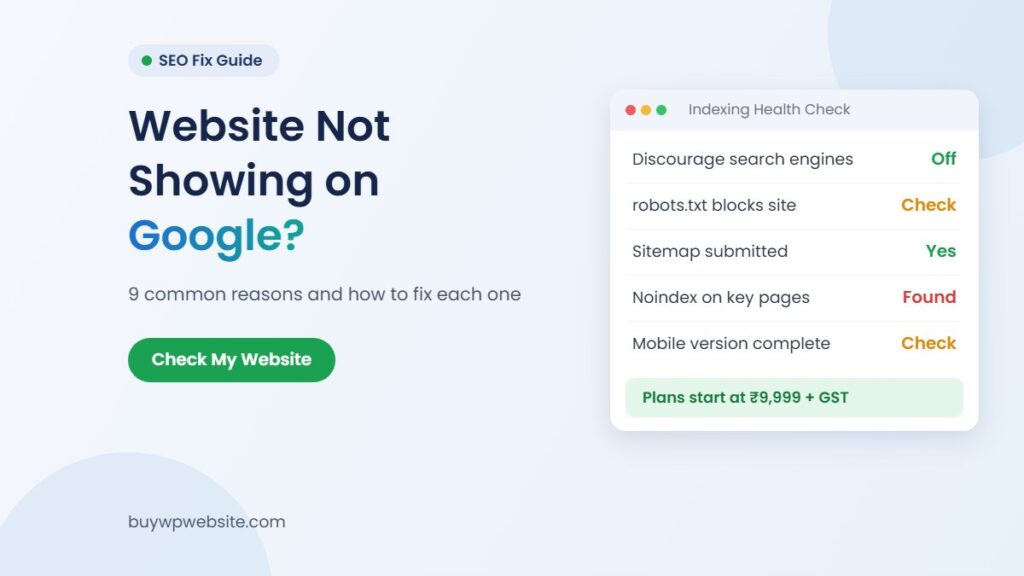
2. A noindex tag or “Discourage search engines” is switched on
This is a common cause on new WordPress sites. Designers tick Settings > Reading > Discourage search engines from indexing this site while building and forget it at launch. Since WordPress 5.3, this option adds a noindex, nofollow robots meta tag to your pages, as the WordPress Reading settings documentation explains.
Fix: Untick the box and save. Check your SEO plugin for noindex pages too. Then request indexing.
3. robots.txt is blocking Google
Your robots.txt file tells crawlers what they may visit. A line like Disallow: / blocks the whole site. Google’s noindex documentation also warns that if robots.txt blocks a page, Google cannot see any noindex tag on it either.
Fix: Open your robots.txt and remove any rule that blocks pages you want found. Add a line pointing to your sitemap.
4. No sitemap and no links pointing to your site
Google finds pages mostly through links. WordPress and SEO plugins create a sitemap automatically, but many owners never submit it.
Fix: Submit your sitemap URL in the Sitemaps report in Search Console. Google’s sitemap guide calls a sitemap a hint, not a guarantee, so also get a few genuine links: your Google Business Profile, social pages and trade directories.
5. Thin or duplicate content
Pages with two lines of text, or copied from another site, give Google little reason to index them. When pages are very similar, Google picks one version to show and leaves the others out, a process it calls canonicalization. The Page indexing report in Search Console will show statuses like “Crawled – currently not indexed” or “Duplicate without user-selected canonical”.
Fix: Write original text for each page: what you offer, where, for whom and how to contact you. Our guide on how many pages a small business website needs shows what each page should cover.
6. Your content is locked inside images
Many local business sites are built from banners and flyers with the text baked into images. If your services, city and phone number exist only in pictures, Google may not understand the page.
Fix: Put key information in real text and add descriptive alt text to images.
7. Your site is hacked or has a manual action
A hacked site can fill up with spam pages or get a warning label. Separately, Google can apply a manual action when a reviewer finds spam practices, and affected pages may be ranked lower or left out of results.
Fix: Check the Security issues and Manual actions reports in Search Console, fix the problems, then use Request Review in that report.
8. The mobile version is weak or very slow
Google indexes the mobile version of your site (mobile-first indexing), so if your mobile view hides content, Google sees less. Its Core Web Vitals guidance also recommends fast, responsive pages.
Fix: Check your site on a phone over mobile data.
9. You see your Google Business Profile, not your website
Many owners search their name and see the Maps listing but no website. The two are separate, and a profile with no website link cannot send searchers to your site.
Fix: Claim or verify your Business Profile and add your website address to it.
Quick diagnosis table: symptom, likely cause, fix
| What you see | Likely cause | What to do |
|---|---|---|
| site: search shows nothing, site is under a month old | Google has not found it yet | Verify in Search Console, submit sitemap, request indexing |
| Search Console shows “URL marked ‘noindex'” | Discourage search engines setting or SEO plugin noindex | Untick the setting, fix plugin, request indexing |
| Search Console shows “URL blocked by robots.txt” | Disallow rule in robots.txt | Edit robots.txt, retest live URL |
| “Crawled – currently not indexed” on many pages | Thin, repeated or low-value pages | Rewrite pages with original, useful text |
| Home page indexed, inner pages missing | No sitemap, weak internal links | Submit sitemap, link pages from menu and home page |
| Spammy titles in site: results or a warning label | Hacked site | Check Security issues report, clean and secure the site |
| Shows for business name, not for your service | Indexed but not ranking | Improve service pages, local SEO and links |
WordPress website not showing on Google: a 10-minute check
If your site runs on WordPress, these checks catch most problems.
- Go to Settings > Reading and make sure “Discourage search engines” is unticked.
- In your SEO plugin, confirm pages and posts are allowed in search results.
- Visit yourdomain.com/robots.txt and check there is no
Disallow: /line. - Find your sitemap (often /sitemap_index.xml or /wp-sitemap.xml) and submit it in Search Console.
- Check the site opens on https:// and that www and non-www point to one address.
- Run URL Inspection on your home page and your two most important service pages.
If all of this looks right and the site is over a month old, the problem is probably content or competition, not a setting.
Indexed but not ranking: brand vs keyword searches
Take a made-up example: an interior firm called “Sharma Interiors” in Jaipur. Its owner searches the firm’s name and the site appears, but a search for “interior designer in Jaipur” does not show it. The site is indexed; Google just ranks other pages higher for the general phrase.
Google’s explanation of how Search works is clear that it does not accept payment to rank a site higher, and it does not promise that any page will be crawled, indexed or shown.
What usually helps a small business:
- A separate page for each main service, with your city in the heading and text.
- A complete, verified Google Business Profile that links to your website.
- Real reviews and the same name, address and phone everywhere online.
If your old site is hard to update, a website rebuild may be quicker than patching it; our website designer vs website builder comparison helps you decide. For ongoing SEO, Webuncles offers digital marketing and SEO services.
How BuyWPWebsite can help
If your site has deeper problems, such as no real text, a broken mobile view or a hacked install, fixing settings may not be enough. Our website revamp service redesigns your existing website instead of patching it page by page. To budget for a new build, see our guide to website cost in India.
If you are starting fresh, our Business website plan starts at ₹9,999 + GST for 5 pages (about 4 working days), with Standard (15 pages) at ₹14,999 + GST and Premium (40 pages) at ₹24,999 + GST. Every plan includes design, hosting, domain, SSL and maintenance. Want to see the look first? Order a ₹999 + GST design preview. You can compare all options on the plans page, and see our terms for what each plan includes.
Not sure what is wrong? Send us your website address on WhatsApp with your question. We will tell you honestly whether a settings fix or a revamp makes more sense. We cannot promise rankings.
Frequently asked questions
Why is my website not showing on Google search?
Usually Google has not indexed it yet or a setting is blocking it: a new site, a noindex tag, a robots.txt block or thin pages. If it is indexed but hard to find, it is a ranking issue.
How long does it take for a new website to show on Google?
Google says it can take a few weeks to notice a new site. Submitting a sitemap and requesting indexing in Search Console can help, but neither guarantees a date.
How do I check if Google has indexed my website?
Search site:yourdomain.com for a rough check. For an exact answer, use URL Inspection and the Page indexing report in Search Console.
Can I pay Google to show my website in search results?
No. Google states it does not accept payment to crawl a site more often or rank it higher in organic results. Google Ads is a separate, paid product, and those results are labelled as sponsored.
Why does my website show for my business name but not for my service?
Your site is indexed, but other pages rank higher for the general keyword. Stronger service pages, a linked Business Profile and reviews usually help over time.
Can a hacked website disappear from Google?
Yes, it can lose visibility or show a warning. Check the Security issues report, clean and update the site, then request a review.