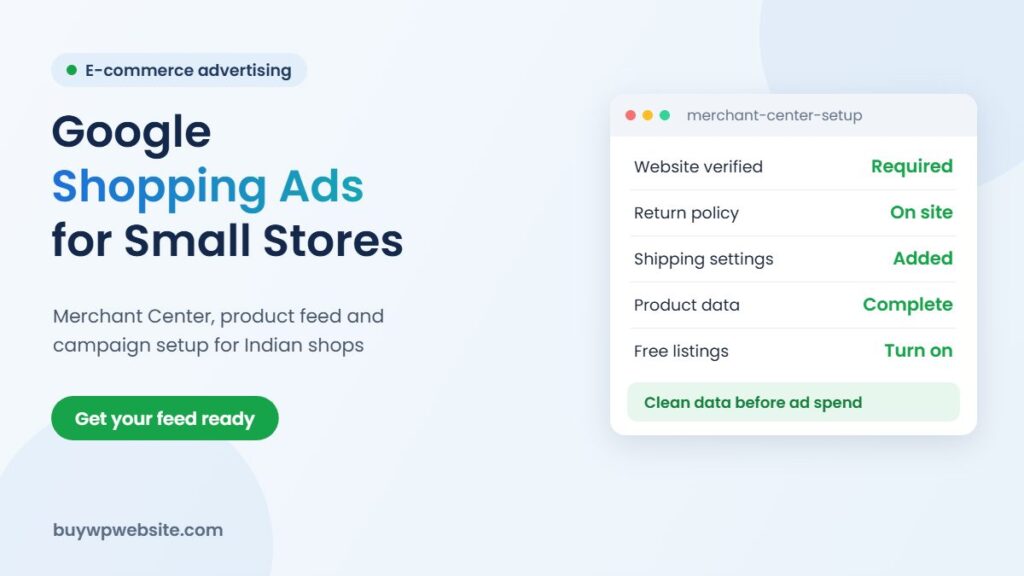
Quick answer: Google Shopping ads in India show your product photo, price and store name directly in Google results. To run them, you need your own online store, a Google Merchant Center account linked to Google Ads, a product feed with accurate data, and clear shipping and return policies on your site. Start by turning on free listings, fix every product disapproval, then run a small Shopping or Performance Max campaign on your best sellers.
For makers of ODOP products such as Thewa jewellery, Bikaneri namkeen, Kota Doria sarees or wooden handicrafts, Shopping ads are often the first paid channel worth testing after a store goes live. They suit products people buy by looking at them. This guide covers the setup for a small WooCommerce store and is part of our ODOP scheme guide series.
What Google Shopping ads are, and how free listings differ
Shopping ads appear at the top of Google results and in the Shopping tab with an image, price and store name. You pay when someone clicks. Free listings use the same product data from Merchant Center and can show your products in parts of Google at no cost, though Google does not guarantee they will appear. According to Google’s free listings help page, India is one of the countries where shipping information is required in Merchant Center.
| Free listings | Shopping ads | |
|---|---|---|
| Cost | No cost per click | You pay per click |
| Placement | Organic product spots across Google surfaces | Ad slots at the top of results and on the Shopping tab |
| Control | Little control over when products appear | Budgets, bids, product groups and negatives |
| Needs | Merchant Center and product data | Merchant Center linked to Google Ads, plus ad budget |
Free listings are a sensible first step: they test your feed and show which products attract clicks before you spend.
What you need before running Google Shopping ads in India
- Your own store: products with individual pages, prices in rupees and a working checkout. Marketplace listings alone are not enough.
- Verified and claimed website in Merchant Center.
- Policies on the site: return and refund policy, shipping policy, terms and contact details that a customer can find easily.
- Shipping settings in Merchant Center that match what checkout charges.
- Accurate product data: ID, title, description, link, image, price and availability, plus brand and GTIN or MPN where they exist.
If you don’t have a store yet, our guide to e-commerce website cost in India explains the options and budgets.
Setting up the product feed from WooCommerce
For WooCommerce, Google’s official extension (Google for WooCommerce) connects your store to Merchant Center and Google Ads and syncs products automatically. Other feed plugins also exist. Whichever you use, the feed is only as good as your product data.
Titles that match how people search
Lead with what the product is, then key attributes: “Handmade Thewa Pendant, Green Glass, 22K Gold Work” is far more useful than “Royal Beauty Collection 12”. Avoid promotional words such as “best” or “sale” in titles.
Images that pass review
Use a clean product photo on a plain background, without watermarks, logos over the product or promotional text. Lifestyle shots can go in additional images.
Handmade products without barcodes
Many craft and food products have no GTIN. Do not invent barcodes. Provide the brand and set the field that tells Google no identifier exists for that product, so it is not rejected for a missing GTIN.
Prices and stock that always match
The price and availability in the feed must match the product page. Mismatches are a common reason for disapprovals, so make sure the plugin syncs after every price or stock change.
Why products get disapproved, and how to fix it
After your first sync, Merchant Center lists issues for each product. The usual culprits for small stores are easy to fix once you know where to look:
| Issue | Typical cause | Fix |
|---|---|---|
| Price mismatch | Sale price or tax shown differently on the page | Keep feed and product page prices identical; resync after changes |
| Missing shipping information | No shipping settings in Merchant Center | Add shipping rules that match your checkout |
| Image problems | Watermarks, text overlays or placeholder images | Upload a clean main photo for every product |
| Misrepresentation | Policies or contact details hard to find | Link return, shipping and contact pages in the footer |
| Unavailable landing page | Broken links or draft products in the feed | Remove deleted products and test each URL |
Fix issues in your store first, then let the feed update, rather than editing data only inside Merchant Center.
Choosing a campaign: Standard Shopping or Performance Max
A Standard Shopping campaign shows only Shopping ads and gives clearer control over products, bids and negative keywords. Performance Max uses the same feed but runs across more Google placements with more automation. For a small store with few sales so far, starting with Standard Shopping on your best sellers makes it easier to see what is working; Performance Max may suit you once you have reliable conversion data.
Keeping costs under control
- Group products by margin and push budget towards those that can afford advertising.
- Exclude very low-priced items whose profit cannot cover a click or two.
- Add negative keywords such as “free”, “wholesale” or “DIY” if those searches never convert for you.
- Track purchases as conversions so you can see return on ad spend, not just clicks.
- Review the search terms report and product performance weekly in the first month.
How we help you get Shopping-ready
Our professional WooCommerce store (₹25,000 + GST) includes 10 pages and 10 products, with payments and shipping set up, which covers the basics Merchant Center checks for. You arrange the hosting, or host with Webuncles at extra cost. Once your store is live, the Webuncles PPC management team can set up Merchant Center, the feed and Shopping campaigns. For more channels, see our guide to selling ODOP products online.
ODOP technology partner
The scheme supports your business. We build the technology behind it.
From your first website to marketing and business software, one team handles the digital side of your ODOP business, so you can focus on making your product.
- Online store or business website
- Logo, packaging, label, brochure and flyer design
- Product cataloguing for your website and marketplaces
- SEO, Google Ads and Meta (Facebook & Instagram) Ads
- ERP, CRM, billing and finance software
Proper paperwork: a written quotation before we start and a GST invoice (bill) for the work we deliver — the documents your DIC usually asks for with a claim.
Chat on WhatsApp See website plans
More help: ODOP scheme guide · Rajasthan ODOP policy & subsidies · All ODOP guides
Please note: ODOP subsidies, grants and reimbursements are approved and paid only by the government, through your District Industries & Commerce Centre (DIC) or the scheme's official portal. BuyWPWebsite and Webuncles are private technology service providers, not a government office or agent. We cannot approve, guarantee, refund or reimburse any scheme amount, and our fees are for the work we deliver, payable as per our terms whether or not a claim is approved. Scheme rules change; please confirm the current rules with your DIC before you spend.
Frequently asked questions
Are Google Shopping ads available for small stores in India?
Yes. Any business that meets Google’s Merchant Center and Shopping policies can advertise products sold on its own website, including small stores.
Can I run Shopping ads without a website?
No. Shopping ads send people to product pages on your own store, so you need a website with product pages and checkout.
What if my handmade products have no barcode?
Leave the GTIN empty and indicate in your feed that no product identifier exists, while still providing the brand. Never make up a barcode.
Should I start with free listings or paid ads?
Start with free listings to test the feed and fix errors, then add a small paid campaign for your best sellers.
Sources: Google Merchant Center Help. Facts checked in November 2026.