Quick answer: If you are asking when to move to ERP, the honest signal is not your turnover but your mistakes. When stock figures in Excel no longer match the godown, when two people keep different versions of the same sheet, or when month-end GST work takes days of re-typing, a simple ERP will usually pay for itself. Small ODOP units can often start with just inventory, billing and purchase modules and add the rest later.
Excel is a brilliant tool. Most small factories in Rajasthan, from marble processors to namkeen makers, have run on it for years. But spreadsheets were built for calculation, not for many people recording the same business at the same time. This guide helps you judge whether you have outgrown them, what an ERP really changes on the shop floor, and how to make the switch without stopping production. It is part of our series on the ODOP scheme and digital tools for district-product units.
When to move to ERP: seven warning signs in your spreadsheets
Look at the last three months and count how many of these you recognise. Three or more is a strong hint that the time has come.
- Stock never matches. The sheet says 40 slabs or 200 kg of raw material, the godown says something else, and nobody can explain the gap.
- Files called “final”, “final-2” and “final-new”. Different staff edit their own copies and data is lost when they are merged.
- One person holds everything. If your accountant or supervisor goes on leave, nobody else can tell you pending orders or dues.
- Orders are typed three times – once in the order register, again in the invoice, again in the dispatch sheet.
- You cannot answer simple questions quickly, such as “Which product earned the most margin last month?” or “Which buyer is 60 days overdue?”
- Month-end is a crisis. GST returns, payment follow-ups and stock counts all pile up in the same week.
- Growth is blocked. You are refusing a bigger buyer, a second shift or an online store because you fear the paperwork will collapse.
What an ERP actually does that Excel cannot
ERP (enterprise resource planning) sounds like software for large companies, but at its core it is just one shared database where every department records its work once. The difference shows up in daily routines.
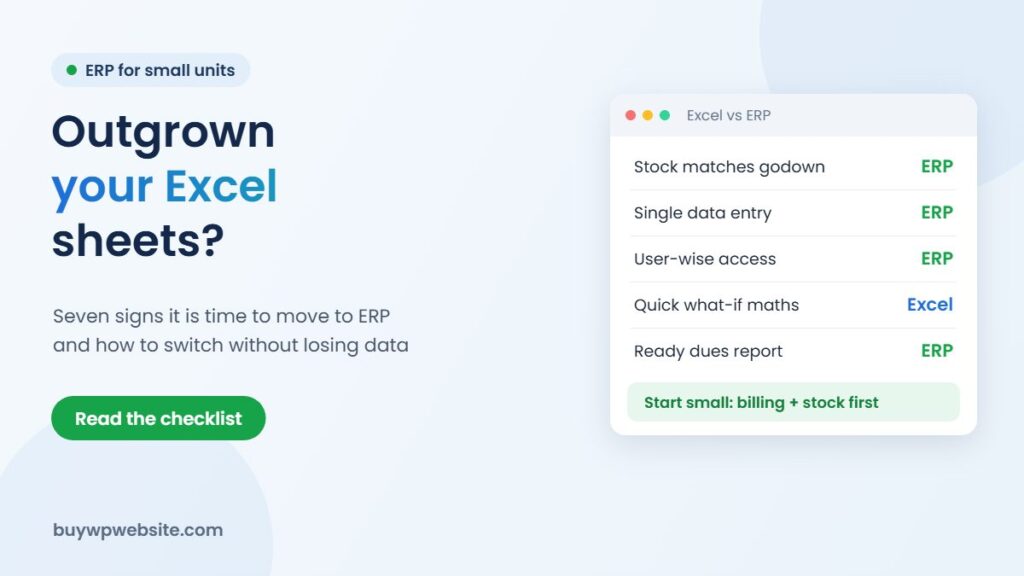
| Daily task | In Excel | In a simple ERP |
|---|---|---|
| Recording a sale | Typed in order sheet, then invoice, then stock sheet | Entered once; invoice and stock update together |
| Raw material reorder | Someone notices it is running low | Reorder level alert when stock falls below a set quantity |
| Who changed what | Usually unknown | Each entry is linked to a user login with date and time |
| Access control | Whole file shared or not shared | Sales staff see orders; only owner sees margins |
| Reports | Built by hand with filters and pivots | Ready reports for sales, dues, stock ageing and production |
| Mobile use | Awkward on a phone | Most modern systems have a mobile app or browser view |
An ERP will not fix a messy process by itself. If your item names are inconsistent or nobody records returns today, the new system will simply record that confusion faster. Clean-up comes first.
Is your unit too small for ERP?
Size matters less than complexity. A five-person unit that buys many raw materials, makes several product variants and sells to both dealers and online buyers often needs structure more than a 30-person unit making one standard item for a single trader.
A rough way to judge it:
- Stay on Excel (with discipline) if you have a handful of products, one person entering data, and fewer orders than you can track on one screen.
- Move to accounting + inventory software if billing and stock are the pain but production is simple.
- Move to an ERP if you also track production batches, job work, multiple godowns, dealers with credit limits, or online orders that must reduce stock automatically.
Which modules to start with
Buying every module on day one is the most common reason small ERP projects fail. Staff get overwhelmed and quietly go back to their sheets. A phased start works better for district-product units:
Phase 1: masters, sales and stock
Create clean item, customer and supplier lists; start billing and stock from the ERP. This alone removes most double entry.
Phase 2: purchase and production
Add purchase orders, a bill of materials for each product (how much raw material, packing and labour goes into one unit) and production entries. Now you can see real cost per piece.
Phase 3: CRM, dealers and online orders
Connect enquiries, dealer follow-ups and website orders. Our guide to ERP and CRM software for ODOP units compares the options for this stage.
How to move from Excel without losing data
- Freeze a cut-over date, ideally the start of a month or quarter, so opening balances are clear.
- Clean your masters in Excel first. One name per item, one code per customer, GSTIN and HSN checked.
- Do a physical stock count on the cut-over date and load those numbers, not the sheet’s numbers.
- Import only open items – pending orders, unpaid bills, current stock. Old history can stay in Excel as an archive.
- Run both for two to four weeks and compare totals daily, then switch Excel to read-only.
- Train by role: the dispatch person only needs to learn dispatch screens.
Costs and the ODOP technology support
ERP pricing varies widely: some tools charge per user per month, others a one-time licence plus yearly support, and custom systems are quoted per project. When you compare, add implementation, data migration, training and the hardware or internet upgrade you may need, not just the licence.
Under clause 7.2 of the Rajasthan ODOP Policy 2024, eligible units can seek assistance of 50% of the cost of technology and software, up to ₹5 lakh, where it is procured through Government of India or Government of Rajasthan institutes. This support is subject to approval and the current guidelines, so confirm the eligible vendors, documents and process with your District Industries & Commerce Centre (DIC) before you sign a purchase order. Our Rajasthan ODOP Policy guide explains the full list of clauses.
How we can help
BuyWPWebsite builds the customer-facing side: a business website (plans start at ₹9,999 + GST) or a WooCommerce online store whose orders can later flow into your ERP. For the back office, our parent company Webuncles offers ERP solutions for small manufacturers and can help you plan modules and data migration. We are a private technology provider, not a government office, and we do not decide subsidy approvals. If you want broader context, this article on digital transformation strategies is a useful read.
ODOP technology partner
The scheme supports your business. We build the technology behind it.
From your first website to marketing and business software, one team handles the digital side of your ODOP business, so you can focus on making your product.
- Online store or business website
- Logo, packaging, label, brochure and flyer design
- Product cataloguing for your website and marketplaces
- SEO, Google Ads and Meta (Facebook & Instagram) Ads
- ERP, CRM, billing and finance software
Proper paperwork: a written quotation before we start and a GST invoice (bill) for the work we deliver — the documents your DIC usually asks for with a claim.
Chat on WhatsApp See website plans
More help: ODOP scheme guide · Rajasthan ODOP policy & subsidies · All ODOP guides
Please note: ODOP subsidies, grants and reimbursements are approved and paid only by the government, through your District Industries & Commerce Centre (DIC) or the scheme's official portal. BuyWPWebsite and Webuncles are private technology service providers, not a government office or agent. We cannot approve, guarantee, refund or reimburse any scheme amount, and our fees are for the work we deliver, payable as per our terms whether or not a claim is approved. Scheme rules change; please confirm the current rules with your DIC before you spend.
Frequently asked questions
Can I keep using Excel alongside an ERP?
Yes, for analysis. Most ERPs export reports to Excel. What you should stop is entering live transactions in both places, because the two will drift apart.
How long does an ERP switch take for a small unit?
It depends on how clean your data is and how many modules you start with. A phased start with billing and stock is far quicker than a full rollout; ask vendors for a written plan with dates for each phase.
Will my staff be able to use it?
If you choose a system with simple screens, Hindi or local-language support where needed, and role-wise training, most staff adapt within weeks. Involve your supervisor and accountant in the demo before buying.
Is ERP software covered under the ODOP policy?
Technology and software support exists under clause 7.2 of the Rajasthan ODOP Policy 2024, but it is not automatic. Eligibility, vendor conditions and approval are decided by the department, so confirm with your DIC first.
Scheme details from the Rajasthan ODOP Policy 2024. Facts checked in November 2026.